The iPad Pro Screen Mockup as a Practical Design Asset
When evaluating tools for presenting app concepts, website layouts, or product visuals, the iPad Pro screen mockup consistently appears as a resource worth examining. Unlike generic device frames, a well-constructed mockup offers a controlled environment for showcasing digital work within a realistic hardware context. This article provides a practical assessment of the iPad Pro screen mockup, focusing on its characteristics, usefulness, and fit for different professional workflows.
What Defines the iPad Pro Screen Mockup
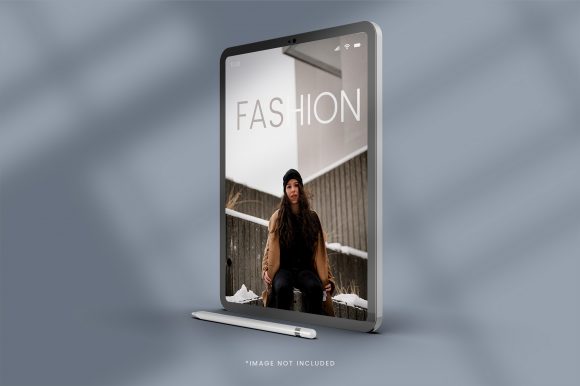
A screen mockup for the iPad Pro is essentially a layered file—often provided in PSD, Sketch, Figma, or Adobe XD formats—that places a user’s design onto a realistic representation of the device. The best examples include separate layers for the screen area, bezels, and environmental elements such as shadows or reflections. What distinguishes a high-quality iPad Pro screen mockup from a basic template is the attention to detail in the device rendering. The curvature of the edges, the proportion of the bezel, the placement of the front camera, and the subtle lighting all contribute to an authentic presentation.
The screen mockup typically supports smart object placement, meaning a designer can place their artwork into a predefined layer, and the file automatically applies perspective, shading, and masking. This eliminates the need for manual alignment or perspective adjustment. The format also often includes multiple angles or orientations, such as portrait, landscape, or a combination of both, to accommodate different presentation needs.
Purpose and Practical Strengths
The primary purpose of the iPad Pro screen mockup is to bridge the gap between a flat design file and a contextual presentation. When pitching a concept to a client or showcasing work in a portfolio, placing the design on an actual device helps viewers understand scale, proportion, and real-world appearance. The practical strengths of a good mockup lie in its ability to communicate without extra explanation. A well-arranged scene with appropriate lighting and depth signals professionalism and careful consideration.
For designers who work with responsive or tablet-specific interfaces, the iPad Pro screen mockup provides a dedicated frame that emphasizes the device’s unique aspect ratio and screen size. This is especially valuable for demonstrating apps, e-book layouts, interactive prototypes, or data dashboards that are optimized for the tablet form factor. The mockup also allows for quick iteration. Swapping out one design for another within a smart object layer takes seconds, which reduces friction during client revisions or portfolio updates.
Real-World Performance and Usability
In practice, the usability of an iPad Pro screen mockup depends largely on the file structure and the source. Templates from reputable marketplaces or established designers tend to offer organized layers, labeled folders, and clear instructions. When the mockup is well-structured, the workflow is straightforward: open the file, locate the smart object layer, paste the design, save, and the update renders automatically. This process is reliable and predictable.
However, not all mockups perform equally. Some files suffer from disorganized layers, missing fonts, or broken smart object links. Others may rely on rasterized elements that reduce flexibility if the designer needs to adjust the background or lighting after placement. When evaluating an iPad Pro screen mockup, checking the file specification and reading user reviews can save time and prevent compatibility issues. A mockup that works smoothly in the designer’s chosen software—whether Photoshop, Sketch, or Figma—adds efficiency rather than friction.
Quality and Consistency in Presentation
Quality in a screen mockup is measured by how convincingly the design appears integrated with the device. High-resolution textures, accurate reflections, and natural shadow falloff all contribute to a believable presentation. Consistency is equally important. If a designer uses multiple mockups across a portfolio or presentation deck, the lighting, color temperature, and perspective should be coherent. An iPad Pro screen mockup with adjustable background color or environmental lighting offers an advantage here, as it allows the designer to match the mockup to the overall aesthetic of the project.
Another aspect of quality is the level of detail in the device itself. A generic tablet shape may not accurately represent the iPad Pro’s specific characteristics, such as the flat-edge design, the position of the USB-C port, or the speaker grills. For projects where authenticity matters, such as a case study for a client in the tech industry, a precise mockup adds credibility.
Flexibility Across Use Cases
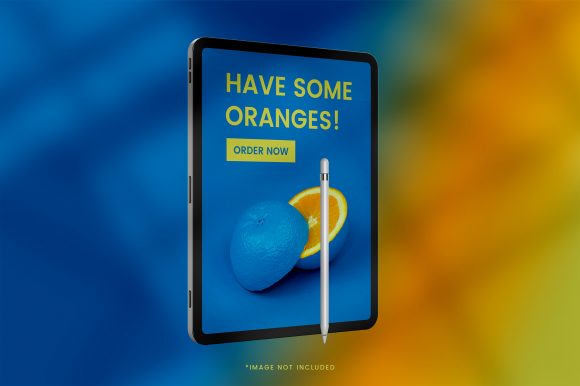
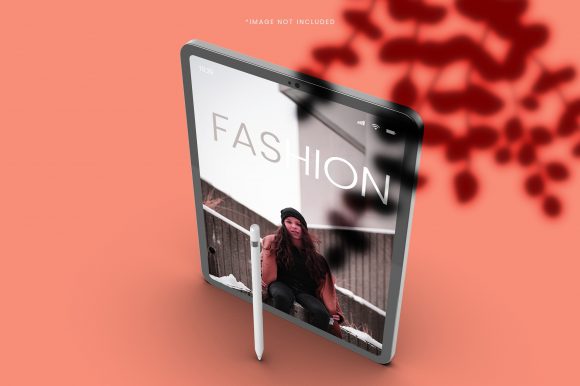
Flexibility is one of the strongest arguments for using a layered iPad Pro screen mockup. The same file can serve multiple purposes: a portfolio piece, a social media teaser, a client presentation slide, or a marketing asset. Some mockups include multiple views on a single canvas, allowing the designer to show the same screen in portrait, landscape, and angled perspective without opening separate files.
For educators and instructors, the iPad Pro screen mockup can be used to demonstrate mobile-first or tablet-optimized design principles in a classroom or workshop setting. For small business owners, the mockup offers a way to visualize a custom app or web interface before committing to development. The flexibility extends to branding as well. By placing a logo or brand element on the mockup’s background, the presentation becomes part of a cohesive identity system.
Who Benefits Most and in Which Situations
The audience for the iPad Pro screen mockup is broad, but certain profiles derive more value than others:
- Freelance designers and creative agencies frequently use mockups during client pitches and portfolio reviews. The ability to present a concept in a polished, device-specific context helps differentiate their work from competitors.
- In-house designers working on tablet applications use the mockup as a validation tool during internal reviews, allowing stakeholders to see the interface in a realistic setting before development begins.
- Entrepreneurs and startup founders working on an app concept can use the iPad Pro screen mockup to create early-stage visuals for investor decks or pitch materials. Even without advanced design skills, a well-structured mockup allows them to place their wireframe or prototype into a professional frame.
- Bloggers and content creators who review apps or digital products can use the mockup to create consistent visuals for articles and social media posts.
- Marketers who need to produce promotional images for app launches or feature updates benefit from the ability to generate fresh visuals quickly without repeatedly setting up a physical device and lighting rig.
- Educators find the mockup a useful teaching aid when explaining responsive design, user interface patterns, or device-specific constraints.
Practical Recommendations and Considerations
When selecting an iPad Pro screen mockup, consider the following points:
- Match the model and generation. The iPad Pro has evolved in size, bezel width, and overall shape across generations. Verify that the mockup represents the specific device you are targeting.
- Check the layer structure. Files that include separate layers for background, shadow, device, and screen offer the most control and allow for easy customization.
- Look for multiple angles. A mockup that provides portrait, landscape, and angled views gives you more options for different presentation contexts.
- Assess the lighting and shadows. Neutral, subtle environmental treatment often yields more versatile results compared to heavy, dramatic effects that may dominate the design.
- Review the license. Some free mockups carry restrictions on commercial use or require attribution. A premium iPad Pro screen mockup with a clear commercial license avoids legal concerns and often comes with better support.
- Test compatibility with your software. Confirm that the file format works with your design tools and that the smart object layers function as expected.
Long-Term Value and Limitations
Over time, a well-made iPad Pro screen mockup retains its usefulness as long as the device design it represents remains relevant. However, as Apple updates the hardware, older mockups may begin to look dated. Designers who present current work should verify that the mockup matches the latest model or choose a stylized mockup that is less tied to specific hardware details.
The long-term value also depends on how frequently the designer or team produces tablet-related deliverables. For those who regularly present iPad-optimized interfaces, the mockup becomes a standard part of the workflow. For occasional use, a single high-quality file is sufficient. Investing in a versatile mockup that includes multiple views and customizable elements can extend its practical lifespan.
A limitation worth acknowledging is that mockups can create a false sense of realism. A design that looks impressive inside a mockup may not account for how the interface behaves under different lighting conditions, user interactions, or accessibility requirements. The mockup is a presentation tool, not a testing environment. Designers should balance mockup presentations with real device testing for critical projects. Additionally, mockups do not simulate interactivity, motion, or responsive behavior, so for demonstrations involving transitions or user flows, a prototype tool may be more appropriate.
The iPad Pro screen mockup offers practical value for designers, marketers, educators, and entrepreneurs who need to present tablet-optimized interfaces in a credible and visually appealing context. Its strengths lie in usability, flexibility, and the ability to communicate design intent without extra explanation. By selecting a well-crafted file that matches the target device and fits the project’s presentation needs, users can enhance their workflow and produce consistent, professional visuals. As with any tool, the key is to use the mockup as a complement to real-world testing and thoughtful design decisions, not as a substitute for them.