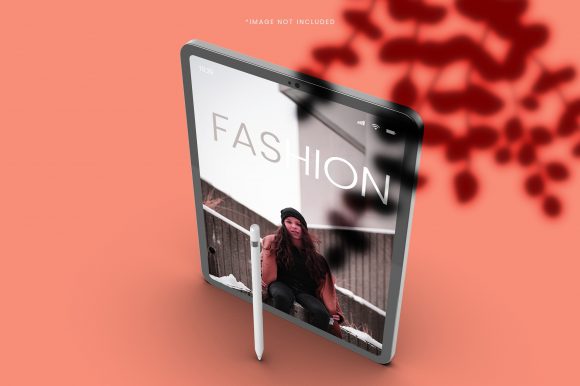
3D iPad Screen Mockups: Visuals That Speak Volumes
You have a concept that could change how people interact with your product, service, or content. The design is polished, the layout is logical, and the colors feel right. But when you present it on a flat screen or a static PDF, something gets lost. The spark you felt while creating it doesn’t quite translate. That gap between your vision and your audience’s perception is where a 3D iPad screen mockup steps in—not as a gimmick, but as a practical tool that helps your work land the way you intended.
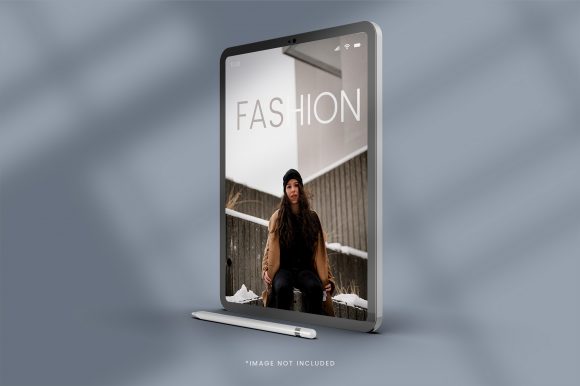
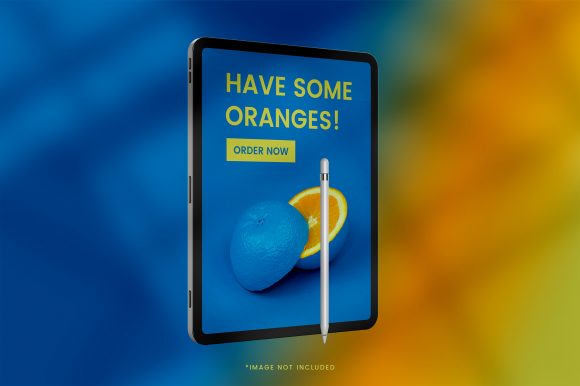
A 3D iPad screen mockup places your design onto a realistic, three-dimensional model of an iPad, complete with lighting, shadows, angles, and environmental context. Instead of showing someone a floating screen capture, you present your app, website, ebook, or portfolio as if it were already in someone’s hands. This small shift in presentation can change how your work is received, understood, and acted upon.
Why Presentation Context Matters More Than You Think
People make snap judgments about visual quality. When you show a raw screenshot, the viewer has to do extra work to imagine how that design would look in a real setting. They have to mentally place it inside a device, picture the bezels, guess at the scale, and wonder about the physical feel. That mental effort distracts from the actual content you want them to evaluate.
A 3D iPad screen mockup removes that friction. By presenting your work inside a lifelike device, you give the viewer a complete visual package. They see the screen content and the device context simultaneously, which helps them focus on what matters—your idea. Whether you are pitching an app concept, showcasing a digital magazine layout, or demonstrating a user interface flow, the mockup does the contextual work for them.
How a 3D iPad Screen Mockup Improves Your Workflow and Results
The value of using a 3D iPad screen mockup extends beyond aesthetics. It can affect how efficiently you work, how clearly you communicate, and how confidently you make decisions.
Presenting Ideas with Greater Clarity
Imagine you are a UX designer showing a new onboarding flow to a product team. You could walk them through a list of screenshots, or you could present those same screens inside a 3D mockup that shows the device in a natural holding position. The team immediately sees how the flow relates to the physical device. They notice the thumb zone, the reachability of buttons, and the visual weight of elements in a real-world context. This clarity reduces back-and-forth questions and helps everyone align faster.
Saving Time on Client Approvals
For freelancers and agencies, client approval cycles can stretch on for days when the presentation lacks context. A client might struggle to visualize how a design will look on an actual iPad. By using a 3D iPad screen mockup, you remove that uncertainty. The client sees the design in a realistic setting and can respond to it as a finished product rather than a work-in-progress. This often leads to faster sign-offs and fewer revision loops.
Supporting Creative Exploration
Creativity thrives when you can see possibilities quickly. A 3D iPad screen mockup lets you experiment with different angles, lighting conditions, and backgrounds without needing to reshoot or rebuild. You can test how your app interface looks in a bright office, a dim living room, or against a textured surface. This exploration helps you make design decisions based on real-world context, which can improve the final user experience.
Strengthening Brand Consistency Across Channels
Marketers and brand managers often need to present the same design across multiple platforms—social media, websites, pitch decks, and print materials. A 3D iPad screen mockup ensures that every representation of your work looks consistent and professional. Instead of using different placeholder devices or varying lighting in each channel, you can rely on a single mockup template that maintains the same visual quality everywhere. This consistency reinforces trust and professionalism.
Who Benefits Most from Using a 3D iPad Screen Mockup
While almost anyone presenting digital content can benefit, certain roles find particular value.
- App developers and UI/UX designers use mockups to showcase interface flows, demonstrate interactions, and present prototypes in a way that feels tangible.
- Digital product creators—such as ebook authors, course creators, and newsletter publishers—use mockups to display their content in a device context that signals quality and professionalism.
- Marketers and brand strategists rely on mockups to create compelling visuals for ads, social media posts, and campaign materials that feature a product or service in use.
- Entrepreneurs and small business owners use mockups in investor pitches, client proposals, and website content to communicate their digital offerings clearly.
- Educators and trainers present course materials, digital handouts, or interactive modules inside a device mockup to help learners see the practical application of the content.
- Freelancers and consultants use mockups to elevate their portfolios, making past projects look polished and professional without needing expensive photography.
Practical Use Cases That Go Beyond the Obvious
The most obvious use for a 3D iPad screen mockup is presenting an app or website design. But the tool works well in less obvious situations too.
Consider a blogger who writes about productivity. Instead of simply describing an app’s interface in text, they can embed a 3D mockup showing the app running on an iPad, with a finger hovering over a key button. That single image communicates more than a paragraph of explanation. It also makes the blog post more shareable and visually engaging, which can improve reader retention and social media clicks.
Or think about an online course creator who wants to sell a digital workbook. A flat PDF preview might not convince a potential buyer of the workbook’s value. But a 3D iPad screen mockup that shows the workbook open on a device, with sample pages visible, immediately conveys the format, layout, and reading experience. The buyer can picture themselves using the product, which increases the likelihood of purchase.
For an agency pitching a brand refresh, a 3D iPad screen mockup can display the new brand guidelines, typography examples, and color palettes inside a device that looks like a real tablet. The pitch deck becomes more immersive, and the client can better imagine how the brand will look across digital touchpoints.
Choosing the Right 3D iPad Screen Mockup for Your Needs
Not all mockups are created equal. Some are static images where you replace a screen layer, while others are fully editable PSD files with smart objects. Some are rendered in high definition with realistic shadows and reflections, while others are simpler and more stylized.
Consider where you plan to use the mockup. For a formal client presentation, a high-fidelity mockup with accurate lighting and subtle reflections may be the right choice. For a social media post, a slightly stylized version that suits your brand aesthetic might work better. If you need to show multiple screens, look for mockups that offer multiple angles or a series of device positions so you can create a narrative flow.
Also think about the editing effort. Some mockups require design software like Photoshop or Affinity, while others are web-based and allow drag-and-drop replacement. If you work in a team, choose a format that everyone can edit without specialized tools. If you work alone and value speed, a web-based mockup may save you significant time.
Limitations and Things to Keep in Mind
A 3D iPad screen mockup is a powerful visual tool, but it is not a substitute for a live demo or a functional prototype. If your goal is to show how an interaction feels—how a button responds to a tap, or how a swipe transitions between screens—a static mockup cannot capture that. In those cases, pair the mockup with a video recording or an interactive prototype to give the full picture.
Another consideration is overuse. If every screen in your portfolio is presented inside a 3D mockup, the effect can become predictable. Use mockups strategically for key visuals while relying on clean screenshots for supporting images. This balance keeps your presentation dynamic without losing the impact of the mockup when it matters most.
Finally, pay attention to the device model and orientation. An older iPad model might look dated, and a portrait mockup may not suit a landscape-focused design. Choose mockups that match the current iPad generation and the orientation that best displays your content. Small details like these signal attention to quality and help maintain credibility with your audience.
Making the Most of a 3D iPad Screen Mockup in Your Projects
Start by identifying the moments in your workflow where visual context would make the biggest difference. For many, that is during client presentations, in portfolio showcases, or on landing pages where first impressions drive engagement. Once you identify those moments, choose a mockup style that complements your brand and your content.
Experiment with different angles and lighting to see what best highlights your work without distracting from it. A front-facing, centered mockup may be best for app interfaces, while a slightly angled view may work better for ebooks or documents where you want to show depth. Test both and see which one your audience responds to more strongly.
If you are sharing a series of screens, consider creating a consistent visual system. Use the same mockup style, lighting, and background across all images to create a cohesive look. This consistency helps your audience focus on the content changes rather than the presentation format.
Finally, treat the mockup as part of your design workflow, not an afterthought. When you plan a project, decide early on how you will present the final output. That way, you can prepare screens in the right resolution and aspect ratio, and you can allocate time for mockup selection and editing. A small upfront investment in presentation planning often pays off in smoother reviews and more positive reactions.
A 3D iPad screen mockup is not about making your work look flashy. It is about removing barriers between your idea and your audience’s understanding. When used thoughtfully, it clarifies your message, saves time in the feedback loop, and helps your work speak with the confidence it deserves.