Smartphone with Birthday Gift Box Mockup: A Practical Guide for Effective Product Presentation
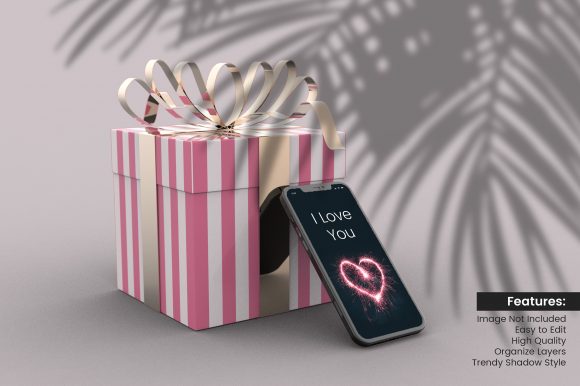
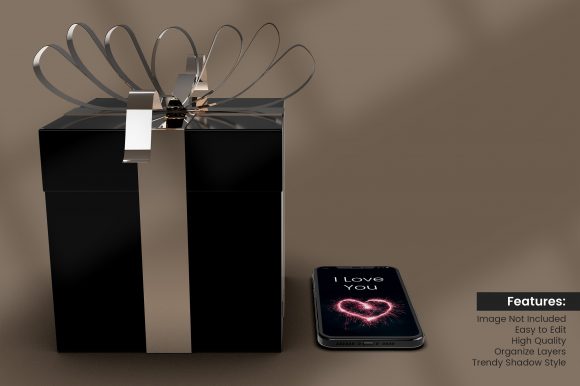
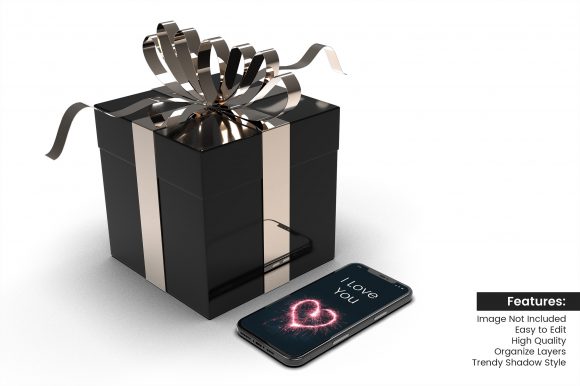
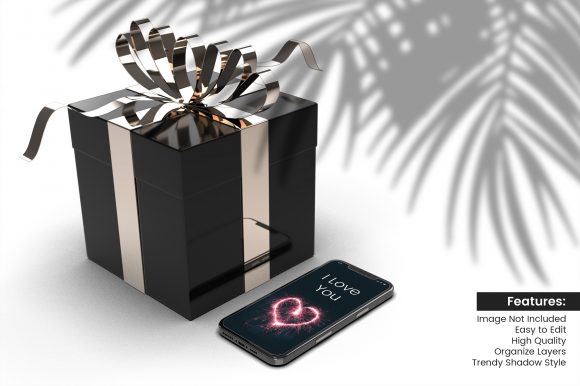
When you need to showcase a smartphone in a context that feels both personal and celebratory, the Smartphone with Birthday Gift Box Mockup offers a distinct visual approach. Unlike isolated device renders or generic lifestyle scenes, this mockup places the product within a narrative of giving and occasion. It is a pre-designed template, usually a high-resolution layered file, that combines a smartphone screen with a gift box, often with decorative elements like ribbons, bows, confetti, or wrapping paper. The mockup is meant to be customized by inserting your own screen design, making it an efficient tool for marketing, social media posts, e-commerce listings, or presentation decks.
What makes it distinct is the fusion of product focus and emotional resonance. The birthday gift box acts as a visual cue for celebration, personal connection, and surprise. This combination can make a brand message feel less transactional and more human. For businesses or individuals looking to promote a phone case, an app, a wallpaper collection, or even a phone-related service, this mockup provides a ready-made context without requiring elaborate photoshoots.
How Does It Compare with Other Mockup Approaches?
Mockups exist on a spectrum from purely functional to deeply atmospheric. The Smartphone with Birthday Gift Box Mockup sits on the atmospheric side, but it is not the only option. Understanding the alternatives helps clarify when this specific mockup is genuinely useful.
- Plain smartphone mockups – These show the device alone, often angled or flat. They are excellent for technical features, UI details, or clean product shots. They lack emotional context, which can make them feel cold or generic. The birthday gift box mockup adds a layer of storytelling.
- Other seasonal or event mockups – Christmas, Valentine’s Day, graduation, or generic “gift” mockups are similar but target different sentiments. A birthday mockup is specific yet widely relatable. It avoids the strong seasonal association of holidays, so it can be used year-round without feeling out of place.
- Lifestyle mockups with people – These show hands holding the phone, or a person interacting with a birthday setting. They can be more engaging but also more restrictive: you must match the model’s appearance, the background, and the lighting to your brand. The gift box mockup is often purely object-based, offering more flexibility for the designer to control the final look.
- Flat lay mockups – These often include multiple objects like a phone, coffee, and books. A birthday gift box mockup is a subset of flat lay but with a focused narrative: the phone is the star, and the box supports it.
Each alternative has its own strengths. The birthday gift box mockup’s advantage is its ability to suggest a personal moment without needing a human subject. This keeps the focus on your screen design or the phone itself while still evoking warmth and intention.
Strengths of Using a Smartphone with Birthday Gift Box Mockup
When evaluating this mockup type, several practical benefits emerge:
- Immediate context – The viewer instantly understands the scenario: a present, a surprise, a celebration. This can increase engagement for birthday promotions, special edition products, or loyalty offers.
- Versatile customization – Most mockups allow you to swap the screen design, adjust the box color, and sometimes change the ribbon or paper. This means one template can serve multiple campaigns by altering small visual cues.
- Time and cost efficiency – Hiring a photographer, buying props, and staging a scene costs significantly more. A quality mockup from a reputable marketplace provides professional lighting and composition with a fraction of the effort.
- Consistent quality – Professional mockups are created with attention to shadows, reflections, and depth of field. This guarantees a polished result even for users who are not design experts.
However, strengths come with tradeoffs. A mockup is only as flexible as its layers allow. Some birthday gift box mockups may have fixed angles, redundant elements, or limited color options. You might find that the box style does not match your brand’s aesthetic, or that the confetti appears cluttered. It is important to preview the mockup’s components before purchasing or downloading.
Tradeoffs and Limitations to Consider
No mockup works for every situation. The Smartphone with Birthday Gift Box Mockup has limitations that could influence your decision:
- Niche application – While birthdays are universal, the mockup can feel inappropriate for products targeting corporate clients, professional tools, or serious health or finance apps. A plain mockup or a minimalist scene would be more suitable.
- Overused aesthetic – With the popularity of mockups, some birthday gift box designs have become very common. If you work in a competitive field, you may want to differentiate by customizing elements like the box texture, ribbon type, or adding subtle props like a card or candles to avoid looking generic.
- Limited storytelling range – The mockup suggests the moment before opening the gift. It does not show the phone in use, the interface in action, or the joy of the recipient. For demonstrating functionality, additional screenshots or video mockups are required.
- Potential mismatches in scale or perspective – Some mockups place the phone and box at angles that can distort your screen design if not set up correctly. Always test with a placeholder image to ensure the perspective matches your screen’s aspect ratio.
Weighing these tradeoffs helps you decide whether this mockup supports your specific campaign goals or whether another format would serve you better.
When This Mockup Is the Right Choice
The Smartphone with Birthday Gift Box Mockup excels in several well-defined scenarios:
- Birthday promotions – If you are running a limited-time discount or special offer tied to a user’s birthday, this mockup aligns the visual with the message, increasing relevance.
- Gift guides or packaging previews – When presenting a smartphone as a gift idea, or showcasing a phone case with a gift box package, the mockup lets the viewer visualize the unboxing experience.
- Social media posts for engagement – Platforms like Instagram and Pinterest perform well with lifestyle imagery. A birthday gift box mockup can work as a standalone image or as part of a carousel, inviting comments and shares from followers who relate to the celebration.
- Cards, invitations, or thank-you notes – For small businesses selling printable cards or phone accessories, the mockup can be used on product pages to convey a thoughtful, personal touch.
In these contexts, the mockup does not just display a product—it suggests a story. That story can increase the perceived value of the item and encourage purchase decisions based on emotion as well as utility.
When You Might Need a Different Option
There are equally valid times when the birthday gift box mockup is not ideal. Consider alternatives when:
- Focusing on technical specifications – If your article or listing emphasizes camera megapixels, processor speed, or battery life, a clear, unadorned mockup with callouts or annotations is more effective.
- Targeting a B2B audience – Business buyers often respond better to clean, professional imagery without festive elements. A mockup with a desk setting or a hand holding the device may be more appropriate.
- Presenting multiple products – If you are comparing different smartphone models or showing a product line, a consistent plain mockup allows viewers to focus on the differences without the distraction of gift wrapping.
- Avoiding visual clutter – Some birthday mockups include elaborate ribbons, multiple boxes, or scattered confetti that can overwhelm your screen design. In such cases, a minimal mockup with only the phone and a subtle shadow may communicate more effectively.
Choosing the right mockup is about aligning visual context with message intent. The birthday gift box mockup works best when the presentation itself is part of the offer.
Realistic Examples of Effective Use
Let’s consider a small business that creates custom phone wallpapers. To promote a birthday-themed wallpaper collection, they could use a Smartphone with Birthday Gift Box Mockup where the phone screen displays one of their designs, and the gift box is styled in matching colors. The result is a cohesive image that shows both the product and a suggested usage scenario. This single image can be used on the product listing, on social media announcing the collection, and in a newsletter.
Similarly, an app developer creating a party planning app might use the mockup to show the home screen of the app placed in a gift box scene. The birthday context reinforces the app’s purpose without needing to show people using it. This approach can be especially useful for app store preview screenshots, where you have limited space to convey the app’s value.
On the other hand, a company selling ultra-thin protective cases might find that a birthday gift box mockup distracts from the case’s slim profile. A plain mockup on a contrasting background would better highlight the product’s design. In that case, the mockup’s strength becomes a weakness.
Key Decision Factors When Choosing a Mockup
To make an informed decision, evaluate the following aspects:
- Intent of your content – Are you trying to evoke emotion, demonstrate features, or simply display a product? The answer will steer you toward or away from a themed mockup.
- Brand alignment – Does your brand voice allow for celebratory imagery? A luxury or minimalist brand might prefer a more restrained version, perhaps with a monochromatic gift box without ribbons.
- Customizability – Look for mockups that let you change not only the screen but also the box and background. The more control you have, the better you can match your campaign.
- Quality of the source file – Check resolution, shadow realism, and ease of editing. A poorly designed mockup can harm your credibility. Read reviews or try a sample if available.
- Uniqueness within your niche – If competitors are all using similar birthday gift box mockups, you may need to differentiate through composition, extra props, or a different perspective.
By systematically considering these factors, you can select a mockup that enhances your product presentation without feeling generic or forced.
Final Thoughts on the Smartphone with Birthday Gift Box Mockup
The Smartphone with Birthday Gift Box Mockup is a versatile and emotionally resonant tool for specific marketing and design needs. It combines product display with storytelling in a way that plain device renders cannot. However, its effectiveness depends entirely on context. When used for birthday promotions, gift-related content, or any initiative where celebration is the core theme, this mockup can significantly boost viewer connection. When used for purely technical or professional communication, it may feel out of place.
Ultimately, the best mockup is the one that supports your message without distracting from it. By understanding the strengths, tradeoffs, and appropriate applications of the birthday gift box mockup, you can make a deliberate choice that serves your audience and your brand. Whether you decide to use it or opt for a simpler alternative, the key is to let the visual context amplify, not overpower, the value of what you are presenting.