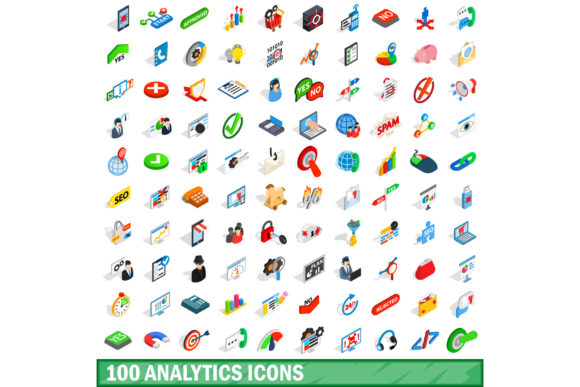
The Role of Analytics Icons in Modern Data Communication
Data is everywhere, and its volume grows larger by the day. But raw numbers mean little without context or clarity. This is where visual communication steps in. Among the most effective tools for bridging the gap between complex datasets and human understanding is a well-crafted set of icons. The 100 Analytics Icons Set is one such resource that has become increasingly relevant for designers, analysts, and content creators alike. Whether you are building a dashboard, preparing a presentation, or designing a mobile app, having a cohesive collection of analytics icons can transform how your audience engages with information.
Why Analytics Icons Matter
Icons serve as visual shorthand. They convey meaning at a glance, reducing the cognitive load required to process data. When someone sees a bar chart icon, they immediately think of comparisons. A line graph icon suggests trends over time. A funnel icon evokes conversion paths. These associations happen automatically, which is precisely why analytics icons are so powerful.
A comprehensive set like the 100 Analytics Icons Set goes beyond basic symbols. It covers a broad spectrum of metrics, actions, and data types. This breadth allows you to maintain visual consistency across multiple touchpoints. Instead of mixing icon styles from different sources, you get a unified language that reinforces your brand or message.
Qualities That Define a Great Analytics Icon Set
Not all icon sets are created equal. Some are too abstract, leaving users guessing what they represent. Others are overly detailed, making them hard to read at small sizes. A well-designed analytics icon set strikes a balance between clarity, simplicity, and expressiveness.
Clarity and Recognizability
An icon should be instantly understood. For example, a tiny magnifying glass over a bar chart immediately signals search analytics. A dollar sign paired with a graph suggests financial metrics. The 100 Analytics Icons Set typically includes these intuitive symbols, so your audience can interpret them without reading labels. This is especially important in dashboards where space is limited and every millisecond of user attention counts.
Scalability and Consistency
Icons need to work across different resolutions and devices. A good set is designed with vector-based formats, such as SVG, so they remain crisp on retina displays and large screens alike. Consistency in stroke weight, corner rounding, and visual weight also matters. When you use a set like the 100 Analytics Icons Set, you eliminate the jarring effect of mixing thin-line icons with solid-filled ones. The result is a polished, professional look.
Comprehensiveness
One of the standout features of the 100 Analytics Icons Set is its range. You get icons for common chart types (bar, line, pie, area, scatter), key performance indicators (revenue, users, sessions, conversion rate), and actions (filter, export, refresh, share). This breadth means you rarely need to supplement with additional icons. Having everything in one place saves time and ensures design harmony.
How Analytics Icons Fit Into Modern Workflows
Analytics icons are no longer just for designers. They have become essential in collaborative environments where stakeholders from different backgrounds interact with data. Consider a product manager reviewing a weekly metrics report. Instead of reading dense text, they scan icons to identify which metrics are trending up or down. This speeds up decision-making and reduces errors.
In business intelligence platforms, icons guide users through complex interfaces. They help distinguish between different report types, filter options, and visualization modes. The 100 Analytics Icons Set can be embedded directly into dashboards, making navigation intuitive even for new users. When users see a consistent visual language across dashboards, they build mental models faster and become more self-sufficient.
In presentations and client reports, icons add a layer of professionalism. A slide filled with bullet points is forgettable. Replace those bullets with icons, and the audience stays engaged. You can use the 100 Analytics Icons Set to represent each key metric, drawing the eye to the most important data. This is especially effective when data storytelling is part of the narrative.
Practical Benefits of Using a Dedicated Analytics Icon Set
Adopting a purpose-built icon set offers several concrete advantages that go beyond aesthetics.
- Time savings: You do not have to search for individual icons or create them from scratch. A set like the 100 Analytics Icons Set gives you a library that is ready to use, speeding up your design and reporting workflows.
- Reduced ambiguity: Generic icons sometimes confuse. An analytics-specific set ensures each symbol has a clear, data-related meaning.
- Brand consistency: When icons share a consistent style, your content feels more cohesive. This strengthens brand recognition and trust.
- Accessibility: Many analytics icon sets include high-contrast versions or provide semantic labels. This makes your content more inclusive for users with visual impairments who rely on screen readers.
Considerations Before Choosing an Analytics Icon Set
With many options available, it helps to evaluate what matters most for your specific use case.
File Format and Licensing
Check whether the set includes SVG, PNG, and font formats. SVG is ideal for web and mobile because it scales without loss. If you work in design tools like Figma, Sketch, or Adobe XD, look for sets that are available as components or symbols. Licensing is another factor. Some sets require attribution, while others offer commercial use without restrictions. The 100 Analytics Icons Set often comes with flexible licensing, which is important if you plan to use it in client projects or commercial products.
Customization Options
Your brand has specific colors, stroke weights, and styles. A good set allows you to modify these properties easily. Vector files let you change colors globally, adjust line thickness, and pair icons with your typography. If you are working on a dark-mode dashboard, ensure the icons have visual clarity against dark backgrounds. Many analytics icon sets, including the 100 Analytics Icons Set, are built with customization in mind, offering multiple color variations or layered components.
Real-World Examples of Usage
Imagine you are designing a SaaS analytics dashboard. You need icons to represent page views, bounce rate, average session duration, goal completions, and user segments. With a general-purpose icon set, you might end up using unrelated symbols that confuse users. With the 100 Analytics Icons Set, you have dedicated icons for each of these metrics. You can even map them to tooltips and legends, so users hover over an icon and see a brief explanation. This kind of thoughtful design reduces the learning curve and enhances user satisfaction.
Another scenario involves marketing teams preparing a quarterly review. They embed icons into slides to highlight growth metrics, churn rates, and customer acquisition costs. Instead of a cluttered slide, they use icons as visual anchors, guiding the audience through the story. The 100 Analytics Icons Set gives them enough variety to represent every relevant metric without repeating the same icon twice.
Who Benefits Most From a 100 Analytics Icons Set
Different roles within an organization can leverage these icons in unique ways.
UX and UI designers use them to create intuitive interfaces, dashboards, and data visualizations. Icons help reduce text clutter and improve scanability. Data analysts and business intelligence professionals embed icons into reports and automated dashboards, making them more accessible to non-technical viewers. Marketers and content creators use icons in blog posts, infographics, and social media assets to illustrate data insights. Product managers incorporate icons into feature documentation and roadmap presentations to communicate priorities visually.
Even educators and trainers benefit. When teaching data literacy, icons help learners quickly associate symbols with concepts. The 100 Analytics Icons Set becomes a teaching aid, turning abstract ideas into visual references that are easier to recall.
Best Practices for Integrating Analytics Icons
Once you have a set, how you implement it matters. Here are some recommendations.
- Use consistent sizing: Icons should be uniform in dimensions to avoid visual noise. Most icon sets provide guidelines for grid alignment.
- Pair icons with labels: While icons are intuitive, always include a brief label for clarity, especially in data-heavy contexts.
- Limit icon complexity: Avoid icons with too many details. Simple, bold shapes work best at small sizes.
- Test across devices: Ensure icons look good on mobile, tablet, and desktop. Vector formats help, but always preview in context.
- Keep the set organized: If you are using the 100 Analytics Icons Set in a design system, name your icons consistently so team members can find them quickly.
Final Observations on Analytics Icon Adoption
The way we interact with data is evolving. As more people rely on visuals to understand information, the demand for high-quality, analytics-specific icons will only grow. A set like the 100 Analytics Icons Set is not just a design asset. It is a communication tool that improves comprehension, reduces friction, and elevates the overall quality of any data-driven project.
When you invest in a comprehensive icon set, you are investing in clarity. You are making your dashboards, reports, and presentations more effective. You are helping your audience see patterns, identify trends, and make better decisions. Whether you work alone or as part of a large team, having a library of analytics icons at your disposal is a practical step toward better data storytelling.
Consider your current workflow. How often do you reach for an icon that does not quite fit? How much time do you spend explaining what a generic symbol means? Switching to a dedicated set removes those pain points. The 100 Analytics Icons Set provides a ready-made solution that is designed for the job. From wireframes to final production, it can serve as a consistent visual language that supports your entire data narrative.
In the end, icons are a small part of the overall design, but their impact is outsized. They guide the eye, clarify meaning, and make data feel approachable. Choosing the right set is a decision that pays dividends every time someone interacts with your content.